


The UX/UI audit is a complete analysis of your user interface with the aim of improving your user experience. This study allows you to detect faulty elements which may be the cause of a drop in the performance of your interface and thus its use. By identifying these anomalies, you will be able to find areas for improvement and provide an optimal user experience.
Are you wondering what exactly carrying out a UX/UI audit involves? What are the differences between the two concepts UX and UI? When should you carry out your audit? What are the stages? Today we have chosen to answer all your questions through this new article!
UX/UI: definitions
UX: user experience
User experience is more commonly called Ux. It designates all the means deployed to create an interface that can meet all of the needs of each user. The aim is to provide an optimal user experience.
However, UX Design should not be confused with the UX designer. The UX designer only qualifies the person in charge of creating an interface that can both fulfill the client's desires as well as the users' needs.
UI: the user interface
The user interface, from English “User Interface”, is more commonly called UI. It refers to the creation of the user interface whether for a website, a mobile or tablet application, a web portal, etc.
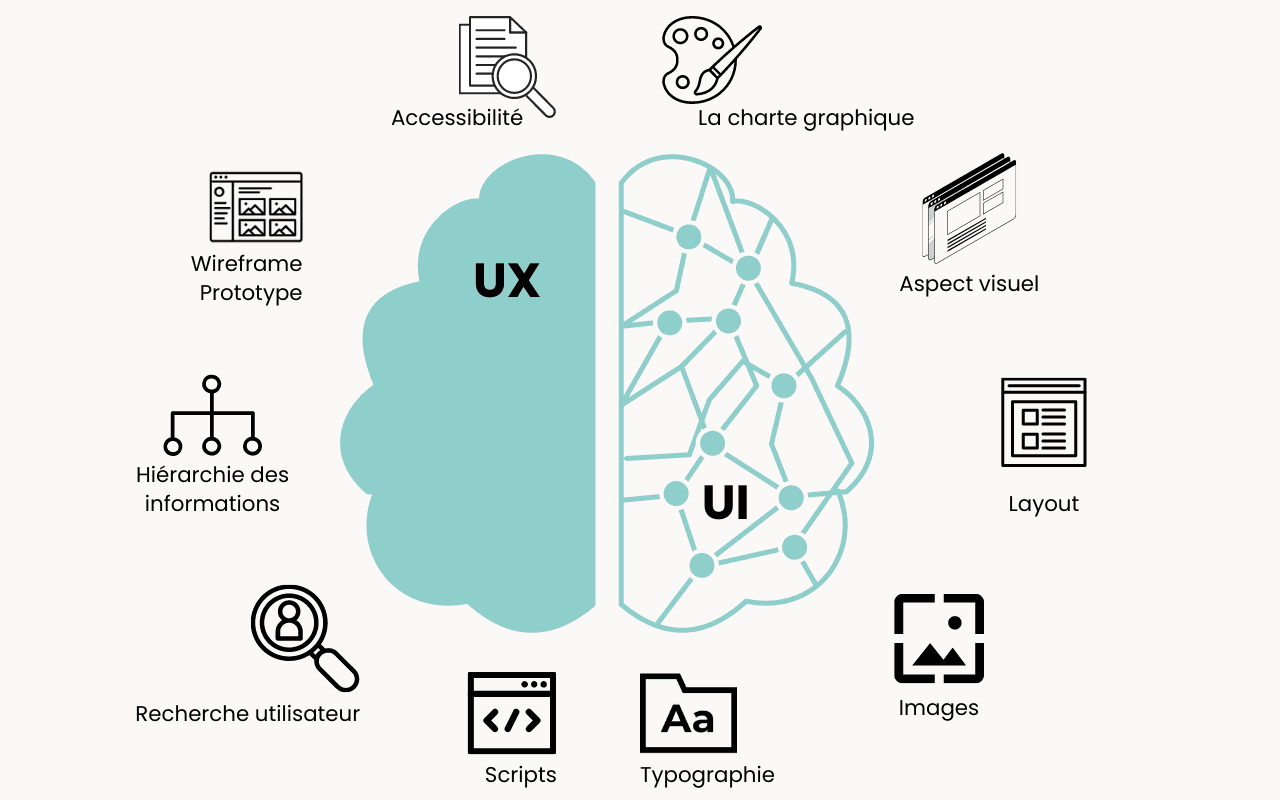
The UI Design, created by the UI designer, is all the graphic elements. We can notably find: the layout, the chosen typographies, the client's logo, the size of the characters, the icons, the graphic charter, the arrangement of the buttons, etc. The goal is once again to simplify user navigation by providing graphic elements that are ergonomic, useful and above all practical.
UX and UI: two complementary concepts
UX and UI are two complementary concepts. Indeed, one does not go without the other and vice versa.
Firstly, the user experience aims to resolve known problems. It will therefore allow the UX designer to implement solutions in order to make it effective. It thus brings together the necessary data in order to create functional models with simple graphics, also called wireframes.
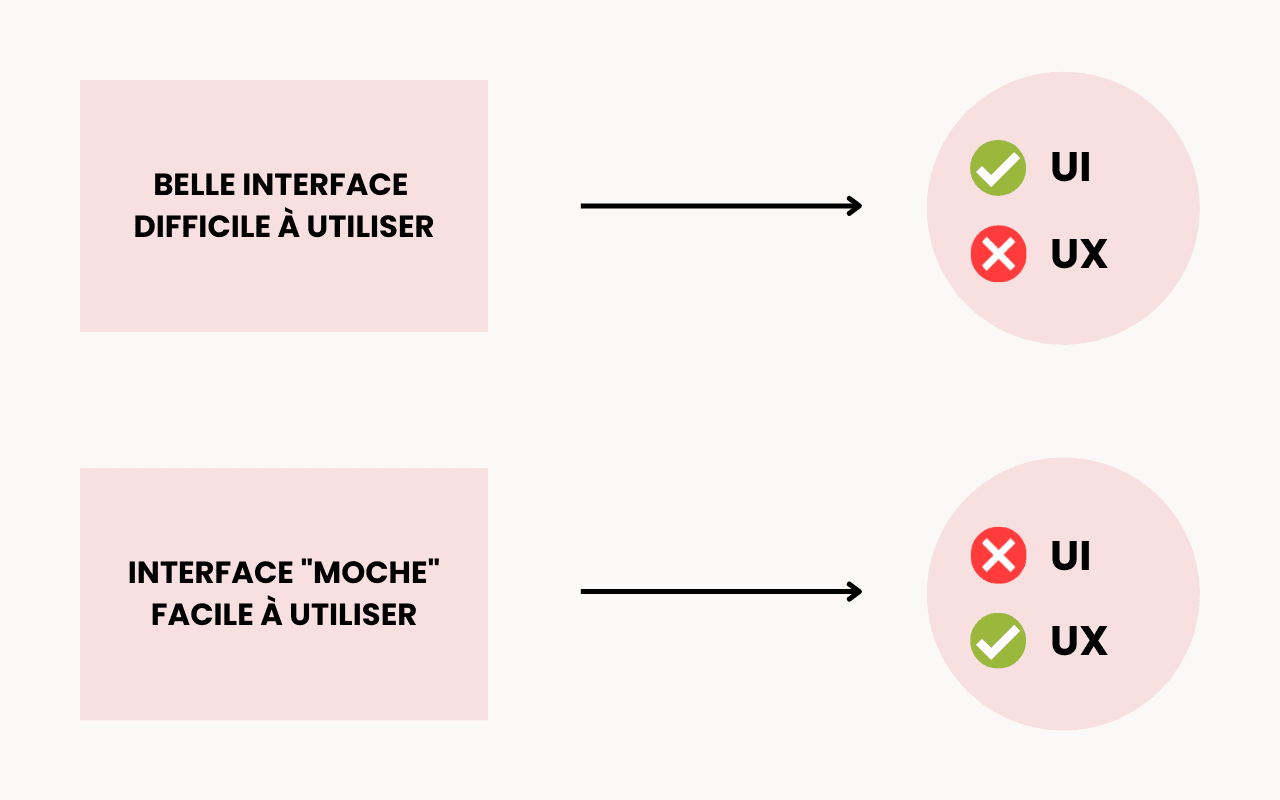
For his part, the UI designer will come and create an interface from the wireframes and project models created by the UX designer. The user interface, namely the visual of the website, will therefore be thought out and then created taking into account the ideas and solutions of the UX designer. This is to achieve a visually beautiful interface that is also easy to use.
If you want to obtain good results, it is essential to work not only on the UX aspect of your website but also on the UI aspect.
Pourquoi faire un audit UX/UI ?
A UX/UI audit aims to test different points of the user experience but also of your interface. It will allow you to take a step back from your already developed website. The audit will therefore detect blockages which may hinder its ergonomics or even reduce its performance.
However, an audit is not done lightly or without a conduct phase. The analysis is based on precise evaluation criteria. These criteria correspond in particular to the UX and ergonomic standards in force. Which leads to the optimization of your interface in order to simplify its use while meeting user expectations.
Indeed, these elements are essential for the user to decide whether to stay on your page or not. The first few seconds are crucial in making this decision. A pleasant and easy-to-use interface will encourage users to continue their experiences. On the contrary, an interface not adapted to their needs will lead them to look for a website that meets their expectations.
Therefore, choosing an ergonomic UX audit is essential if you want to offer a useful and pleasant user experience. This analysis will allow you to identify the elements that block the UX and UI of your website. Which potentially prevents users from fully enjoying their experience on your interface.
Quand effectuer un audit UX/UI ?
A UX/UI audit will aim to monitor the performance of your user interface. It can therefore be carried out at any time. However, the UX/UI audit generally takes place at the start of the project.
Indeed, the UX/UI audit before the project will allow you to identify the needs and expectations of each user. To enable you to create and implement an optimal interface.
Comment faire un audit UX/UI ?
In order to obtain an optimal and reliable UX/UI audit, it is recommended to call on UX/UI experts or designers. They will in fact have an external and, above all, professional look at your interface in order to provide you with suitable solutions.
However, to carry out a UX/UI pre-audit yourself, there are different steps:
Put yourself in the user’s shoes
Whether you are the site owner, the developer or the administrator, you have knowledge of your back office. Whether it is its content or its architecture. However, it is essential to put yourself in the user’s shoes.
In addition to the unique vision of your back office, it is important to look at the other side of the mirror: the front office. You must be able to see yourself as a user and not an administrator or even a developer.
It is therefore a question of doing everything possible to attract potential prospects or customers and make them want to visit your site but above all to stay there. We must therefore identify one or more personas and start thinking about solutions to attract them.
Un panel de testeurs
Being self-critical can be very complicated, this is where the UX designer comes in and will analyze your interface as best as possible in order to provide you with the best solutions.
However, you can also call on people around you to analyze their user experience on your interface.
What features do they like? What are the difficulties encountered? What would they like to see appear on your site? So many questions that will allow you to refine your objectives in order to best meet the expectations of your future users.
Accurate data for comprehensive analysis
Carrying out a UX/UI audit is not just about obtaining the opinions of your potential users. It is also about the collection of accurate data.
Among the data essential to the success of your UX/UI audit, we find in particular: the conversion rates (capacity of your site to convert visits into sales) and bounce rates (percentage of visitors entering your site and leaving immediately). It is therefore necessary to interpret the data collected and understand why your rates may fall in order to find the corresponding solutions.
Other important data to take into account during your UX/UI audit are the keywords but especially the workflow of the targeted users. What are the keywords that can lead to your different pages in order to generate more leads and increase your visibility? What logical sequence follows the user once on your website? What pages does he visit? Etc.
If you are wondering how to obtain this essential information for the smooth running of your audit, Google Analytics will be your ally. This tool will allow you to analyze the users of your site or your application in order to confirm its performance.
A responsive website
With over 80% of searches done on mobile devices, it is important that your site is responsive. In fact, one user in two leaves a web page if it is not suitable for automatic reading on smartphones.
In addition, reading will not be done in the same way on a computer as on a mobile. You must therefore rethink the UX and UI of your site in order to adapt it to the mobile version. These are two completely different experiences.
Three elements are important to take into account in order to offer a site that meets the expectations of your users: performance, ergonomics and content.
First of all, the performance of your site will allow you to know if the loading times of your pages are satisfactory and if your site is secure enough.
Then, the ergonomics are based on a responsive site whose layout is careful and above all adapted to reading on mobile devices.
Finally, the content must be readable in order to make reading your content enjoyable. And thus make users want to stay on your website and potentially transform these visits into sales.
Adapted solutions
Once all this data has been collected, your UX/UI audit is finally finished. You are now ready to analyze them in order to find solutions to the elements that disrupt the proper functioning of your website.
Conclusion
Carrying out a UX/UI audit of your website is an important step in promoting your company on the web. Indeed, this analysis technique is very renowned for its effectiveness.
It aims to identify the usability difficulties of your website which may hamper its user experience. Providing solutions to these problems aims to offer your users more pleasant and, above all, effective interfaces.
You too, carry out your UX/UI audit!
Smotly can support you in your various projects. Indeed, whether for the UX redesign of your website or even a simple audit of it, our experts are there to help you thanks to a precise UX/UI methodology.
Do not hesitate to contact us or request a meeting to discuss your project.